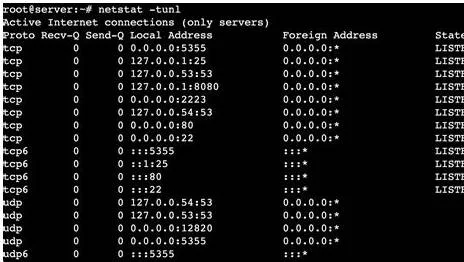
Ever wondered how your Linux system communicates with the world? The answer lies in understanding network connections, and a powerful tool called netstat can unlock those secrets. Mastering netstat is essential for any Linux administrator, providing crucial insights into network performance, security, and overall system health.
The netstat command, short for "network statistics," is a command-line utility that displays information about active network connections, routing tables, interface statistics, listening ports, and more. It's a fundamental tool for network troubleshooting, allowing administrators to quickly diagnose connectivity issues, identify suspicious activity, and monitor network usage. While newer tools like ss have emerged, netstat remains relevant due to its widespread availability and familiarity among system administrators.
Command
netstat
Purpose
Displays network connection information, routing tables, interface statistics, etc.
Availability
Most Linux distributions
Replaced by
ss (in some modern distributions)
Reference
netstat man page
One of the most common uses of netstat is to view active TCP connections. Executing netstat without any arguments provides a snapshot of all established connections, showing the local and remote IP addresses and port numbers, as well as the connection state (e.g., ESTABLISHED, LISTEN, CLOSE_WAIT). This information is invaluable for identifying which applications are communicating over the network and pinpointing potential bottlenecks. For instance, a large number of connections in a TIME_WAIT state might suggest a performance issue that needs investigation.
Beyond simply listing active connections, netstat offers a wealth of additional functionality through various command-line options. The -t flag restricts the output to TCP connections, -u shows UDP connections, and -l displays listening ports. Combining these options allows for granular control over the information displayed. For example, netstat -tl lists all listening TCP ports, providing a quick overview of services running on the system and potentially exposed to the network.
The -n option instructs netstat to display numerical IP addresses and port numbers instead of resolving them to hostnames and service names. This is particularly useful when troubleshooting DNS issues or when speed is critical, as name resolution can add significant overhead. Furthermore, the -p option shows the process ID (PID) associated with each connection, enabling administrators to identify which applications are responsible for specific network activity. This can be crucial for tracking down rogue processes or diagnosing resource consumption issues.
For more in-depth analysis, netstat can be combined with other command-line tools like grep, awk, and sort. For example, to find all connections to a specific IP address, you could use netstat -n | grep "192.168.1.100". Similarly, netstat -an | awk '$6 == "LISTEN" {print $4}' isolates all listening ports and their associated IP addresses. These combinations allow for powerful filtering and analysis of network data.
While invaluable for home or office use, caution should be exercised when using netstat on production servers, particularly web servers. Dynamically generated content via PHP, MySQL, PostgreSQL, and other technologies can lead to a high volume of transient connections, making the output of netstat difficult to interpret. On busy web servers, the constant churn of connections can also impact performance if netstat is used excessively.
Despite the rise of newer tools, netstat remains a valuable asset for network administrators. Its straightforward syntax, versatile options, and integration with other command-line utilities make it a powerful tool for monitoring, troubleshooting, and securing Linux networks. By understanding its capabilities and limitations, administrators can leverage netstat to gain valuable insights into their network infrastructure and maintain optimal system performance.
Beyond the basics, netstat provides options to delve deeper into network statistics. The -s flag displays summary statistics for each protocol, including the number of packets sent and received, errors, and collisions. This information can be helpful for identifying performance bottlenecks or underlying network issues. Furthermore, the -r option displays the routing table, providing a detailed view of how network traffic is routed through the system.
The -i option displays interface statistics, such as the number of bytes transmitted and received, errors, and dropped packets. This information is particularly useful for monitoring network interface performance and identifying potential hardware or driver issues. Combining these advanced options with the filtering capabilities of grep, awk, and sort allows for comprehensive network analysis and troubleshooting.
While netstat has been largely replaced by ss in modern Linux distributions, understanding its functionality remains beneficial for working with older systems or collaborating with administrators who may still rely on it. The knowledge gained from mastering netstat is transferable to other network analysis tools, further strengthening your skills as a Linux administrator.
Related: ["Lookup details about an ip address including location, isp, hostname, type, proxy, blacklist status and more.","Trace, track and locate an ip address.","How to find your ip location.","Finding your ip location is straightforward and can be done in a few simple steps:","Websites like ip location checkers can quickly reveal your current ip address and its corresponding location.","On most devices, you can view your network settings to find your public ip","A public ip address is an ip address that can be accessed over the internet, and a private ip address is an ip address that is local to your private network.","A public ip is a globally unique ip, while a private ip address can be reused in different networks.","Ip tracker allows anyone to create a shortned url, which is a link used to track visitor's ip address and provide an advanced analytics for the traffic obtained through the link.","We created this tool to help internet users to fight against cyberbully, and we strongly discourage anyone from abusing this tool to invade others' privacy.","Can i track the ip address's exact location?","Using ip location finder, you can obtain 95% to 99% accuracy at the country level, 55% to 80% at the regional or state level, and 50% to 75% at the city level.","Advertisers, websites, and internet service providers (isps) can track your online interest by examining your ip address.","Websites will track how often you visit and what pages you view on their websites.","Social media apps and sites track your activity on that app to decide what advertisements they should push on you and what content to recommend.","Ip geolocation tool helps you find the approximate geographic location of an ip address along with some other useful information including isp, timezone, area code, state etc.","Enter the ip address or the host name you want to locate and press discover button, your ip will be tracked in seconds depending if the information of that ip is","Geolocation involves mapping ip addresses to the country, region (city), latitude\/longitude, isp, and domain name among other useful things.","Iplocation.io provides a free ip lookup tool to check the location of your ip address.","Data is gathered through several geo ip data providers.","Just enter an ip and check the location.","Enter an ip or domain name, then find and track an ip location using our free lookup tool.","Use this free online tool to find the geographical location of any ip address.","Enter an ip to view its map position, coordinates, country, region, city, and organization.","View detailed information about your ip address, including its geolocation and autonomous system details.","We have one of the most reliable and accurate databases where you can reliably do your ip address lookup and ip tracking.","Our database covers virtually every ip address location in the world, including name of ip, internet speed, connection speed, and even more.","Paste the ip address you want to check in the field below and get its scan results.","The service ip tracker allows you to get information about the country, city, and provider, and see the device's approximate location with this ip on the map.","Ip tracker allows anyone to create a shortned url, which is a link used to track visitor's ip address and provide an advanced analytics for the traffic obtained through the link.","We created this tool to help internet users to fight against cyberbully, and we strongly discourage anyone from abusing this tool to invade others' privacy.","A virtual private network (vpn) masks your ip address and encrypts your internet connection, making it more difficult for third parties to track your online activities.","Choose a reputable vpn service and activate it whenever you\u2019re browsing the internet, especially on public or unsecured networks.","Can i track the ip address's exact location?","Using ip location finder, you can obtain 95% to 99% accuracy at the country level, 55% to 80% at the regional or state level, and 50% to 75% at the city level.","Advertisers, websites, and internet service providers (isps) can track your online interest by examining your ip address.","Websites will track how often you visit and what pages you view on their websites.","Social media apps and sites track your activity on that app to decide what advertisements they should push on you and what content to recommend.","Encompass holds a strong global reputation with our ability to capture, process and deliver live content in any format, anywhere in the world.","You have 4 lookups left for today.","40.77.167.17 ( united states of america, boydton)","Ip footprints are now crossing boundaries and expanding globally.","Business entities look at protection and enforcement of ip assets from a global perspective.","Anonymity footprints and their challenges.","Anonymity, like security, has many layers.","The raw connection to the internet is only one facet and probably gets too much focus.","Certainly, your ip address can lead back to you, but there are so many ways to hide your ip address that observers have developed other methods of piercing anonymity.","An ip address tracker uses location databases that map ip addresses to track the location of the inputted ip.","Once you enter an ip into the tracker, it assesses the available map data to retrieve information.","This includes the ip's general location, its related isp, information about the internet connection or network type, and more.","Beyond basic geolocation, access detailed ip intelligence data, including country, region, city, zip\/postal code, anonymizer type, user count, confidence factors, static ip score, and more.","Discover the power of our geoip web services tailored to meet your business needs.","Digital footprint \u0e04\u0e37\u0e2d \u0e40\u0e0a\u0e48\u0e19 \u0e1b\u0e23\u0e30\u0e27\u0e31\u0e15\u0e34\u0e01\u0e32\u0e23\u0e04\u0e49\u0e19\u0e2b\u0e32 \u0e01\u0e32\u0e23\u0e1a\u0e31\u0e19\u0e17\u0e36\u0e01\u0e17\u0e35\u0e48\u0e2d\u0e22\u0e39\u0e48 ip address \u0e01\u0e32\u0e23","Holmes, they were the footprints of a gigantic hound!\u201d ~ a.","Doyle, the hound of the baskervilles digital footprints should be a significant privacy concern for internet users, because they can be used to track user actions and are a basis for \u201cprofiling\u201d by online service providers and others."] | ["It\u2019s the same way a payday loan works but with one crucial difference:","When you receive your paycheck, all that comes out is the $100 you actually received \u2014 without an extra $15 or more in interest.","The apps earn money in various other ways, including tips and monthly fees.","Discover the top 6 cash advance apps that can help you get your money faster and manage unexpected expenses without high fees.","Like our cash out tool that lets you access your pay as you work \u2014 up to $150 a day and up to $750 every pay period 1 with no credit checks, no interest, and no mandatory fees.","2 earnin can help you get what you need to keep moving forward, whatever life sends","Transfer your earnings instantly to your bank account, debit card, or pay card with just a few clicks.","Avoid payday loans and overdraft fees with transparent fees that do not impact your paycheck schedule.","Dailypay is an earned income, or wage, access app, meaning you can retrieve money you\u2019ve earned during a pay period before","Tap \u2018albert instant\u2019 to borrow up to $250\u2026 instantly.","Albert offers a great set of tools to manage and better understand your money, including the ability to get up to $250 in minutes, with just a few taps through albert instant.","Before your next unexpected financial curveball, here are some ways to get ready:","Set aside money in a dedicated savings account\u2014ideally three to six months of living expenses\u2014that you only tap in true financial disasters.","Earn up to 3.80% apy 1","New and existing checking and savings members who have not previously enrolled in direct deposit with sofi are eligible to earn a cash bonus of either $50 (with at least $1,000 total direct deposits received during the direct deposit bonus period) or $300 (with at least $5,000 total direct deposits received during the direct deposit bonus period).","Brigit's instant cash feature offers a $250 advance for qualifying plus members.brigit offers a free plan, which comes with financial planning tools to monitor spending and a marketplace for opportunities to earn extra income.","How does a paycheck advance work?","Typically, a paycheck advance is connected to your checking account, and allows you, as the borrower, to get access to your paycheck a few days sooner.","5 best paycheck advance apps.","When unexpected expenses arise, paycheck advance apps can provide quick access to funds without the high fees associated with traditional payday loans.","Even if cash advance apps help you figure out how to get money before payday, more than 30% of the borrowers who use the apps say they struggle to pay back their debt, and 17% have had to skip another bill to pay the money back.","You can sign up for turo and get paid every time someone uses your car.","Research a quick paying app.","There are a variety of apps that you could rely on to borrow a small amount of money before payday.","Apps like earnin or dave are easy to use, and you may be eligible to withdraw up to a certain amount of money before your payday.","One installment on payday or the date you selected in the app, whichever is later dave offers free cash advances but charges a $1 monthly membership.","If you're in a bind and need money fast, you can pay the express transfer fee or potentially wait up to three business days to get your money.","Next pay day or the date you choose fast funding fee:","Uber, the ridesharing app, has always been a popular way for people to earn extra money.","Thanks to uber instant pay, you can get paid up to five times a day.","There are no minimums on how much money you can withdraw at one time.","If you do just one ride and take out that five dollars, uber lets you do it up to five times a day.","Unfortunately, there are many \u201ccash advance\u201d companies that prey on those in need of money before payday, and you can end up paying outrageous fees and interest on those loans.","But there are a few ways to access cash before your next paycheck that won\u2019t break the bank, and they offer more flexibility to repay.","Not a bad result when you need to get paid before payday.","To find the best 0% interest apr credit cards, check out our list here.","You don\u2019t pay interest as long as you pay it off before the promotional period ends.","You\u2019ll get a higher borrowing limit than paycheck advance apps.","Requires good credit for approval.","Cash advance apps are a convenient way to borrow small amounts of money before payday \u2014 typically between $20 to $500.","Unlike other types of loans, cash advance apps don\u2019t charge interest.","Instead, you pay a monthly fee or tip to use the service, although some apps are free.","Discover the top 6 cash advance apps that can help you get your money faster and manage unexpected expenses without high fees.","Chime\u2019s mypay is a line of credit that lets you get up to $500 before payday.^ there are no mandatory fees, no credit checks, and no interest* to get money when you need it.","With mypay, just log into your chime app, see how much is available to you, and then choose how much you want to access.","Cash advance apps are a common way to borrow cash instantly.","Many popular cash advance apps can get you money within 1 to 3 business days but offer \u201cinstant\u201d funding options (for a fee) to get your money within minutes instead.","Terms and conditions will vary by financial institution.","Only use it when you want it, and choose how much money you get as an advance before payday, up to $500 per pay period.","There\u2019s no interest,* no credit check, and no mandatory fees.","There\u2019s no interest,* no credit check, and no mandatory fees.","Using a payday lender seems like the most effective way to get cash when you need it.","The process is simple, locations are easy to find and accessible, and you\u2019ll walk out with money in hand.","However, the interest rates can be 400% apr or more, and the repayment term is short, making it difficult to pay back the money you borrowed without"] | ["To copy a file named myfile.txt from your personal computer to a user\u2019s home folder on your raspberry pi, run the following command from the directory containing myfile.txt, replacing the placeholder with the username you use to log in to your raspberry pi and the placeholder with your raspberry pi\u2019s ip address:","Raspberry pi\u2019s take on remote desktop connections is in beta, and we take you through setting up your raspberry pi 4, 5 or 400 for remote access from across the globe.","Now, you have a remote connection established with your raspberry pi.","Notice that the terminal window at the bottom is connected to your raspberry pi.","Any commands that you run on that terminal window, will be run on the raspberry pi.","You can open raspberry pi folders on vs code to start creating and writing files.","Today, we will examine three methods for effectively and securely accessing your raspberry pi remotely.","Raspberry pi networking & remote access.","We will be working with raspberry pi microcomputers, not a microcontroller like the pico.","Not every method shown will work with every raspberry pi board.","Remote desktop is easy to interface with because when you connect to the device your screen shows the raspberry pi desktop as if you were plugged directly into the raspberry pi.","It\u2019s not all upside though because a remote desktop connection can be laggy and slow.","Controlling your raspberry pi remotely from another computer or device has many benefits.","Here are the best ways to do it.","The small footprint and low energy demands of raspberry pi make it ideal for remote deployment, and accessing raspberry pi from another computer is a common user request.","There are many different solutions for remote access to raspberry pi.","The most common is to use one of two techniques:","Transform your raspberry pi into a versatile remote workstation by setting up remote desktop access in under 30 minutes.","This guide walks you through the essential","Understand everything about the raspberry pi, stop searching for help all the time, and finally enjoy completing your projects.","Master python on raspberry pi:","Create, understand, and improve any python script for your raspberry pi.","Understand everything about the raspberry pi, stop searching for help all the time, and finally enjoy completing your projects.","Master python on raspberry pi:","Create, understand, and improve any python script for your raspberry pi.","Raspberry pi connect is the native and easiest way to access the board remotely using a web browser.it provides a secure encrypted connection to raspberry pi without requiring the ip address to be input.","Connect includes the ability to screen share on raspberry pi models running the wayland window server and remote shell (terminal) access on all raspberry pi models.","For more information, see the connect documentation.","Perhaps you\u2019re using another computer, your raspberry pi is out of reach, behind your tv or a nest of cables or you\u2019re on the road and have left your raspberry pi at home.","Prerequisites to ssh into a raspberry pi.","Now that an ssh server is enabled on your raspberry pi, we only need to do a few more things before connecting to it.","Find the raspberry pi ip address.","An ip address is the identifier of your device on the network.","The complete guide to ssh into your raspberry pi in 2025.","Secure shell (ssh) is an essential tool for anyone working with a raspberry pi, providing encrypted remote access to your device from anywhere on your network.","About remote access on raspberry pi.","I\u2019ve talked a lot on this website about remote access solutions for raspberry pi, with different applications and their pros and cons.","The idea is to control your raspberry pi from another computer, either on the same local network or from anywhere (depending on the solution you use).","Today, we will examine three methods for effectively and securely accessing your raspberry pi remotely.","Raspberry pi networking & remote access.","We will be working with raspberry pi microcomputers, not a microcontroller like the pico.","Not every method shown will work with every raspberry pi board.","Before we get into the remote desktop protocol and the setup process, let\u2019s make sure you\u2019ve got everything you need to get started.","Having all your ducks in a row now will save you from headaches later on.","Any raspberry pi model (raspberry pi 4 or 5 recommended for best performance) a modern windows desktop","Remote desktop is easy to interface with because when you connect to the device your screen shows the raspberry pi desktop as if you were plugged directly into the raspberry pi.","It\u2019s not all upside though because a remote desktop connection can be laggy and slow.","Controlling your raspberry pi remotely from another computer or device has many benefits.","Here are the best ways to do it.","This article updated for the raspberry pi 5.","I still prefer this over raspberry pi connect.","Do you want to remote into your raspberry pi and see a graphical desktop?","If you don\u2019t want to dedicate a monitor or the tv to the pi but still want to use it, here\u2019s your solution.","Now you need to find the ip address of your raspberry pi.","You want the first ip address that appears.","Keep a note of this, you\u2019ll need it to connect to your pi remotely.","To remotely manage a raspberry pi from a pc, with full access to its gui desktop, you can use vnc or rdp.","Here's how to do it."]