Is your Zebra printer flashing a cryptic sequence of red, amber, and green? Understanding these indicator lights is key to swiftly resolving printing issues and minimizing downtime. This comprehensive guide deciphers the language of Zebra printer lights, empowering you to troubleshoot like a pro.
Zebra printers, renowned for their reliability in demanding environments, occasionally encounter hiccups. From the compact ZD421 desktop printer to the robust ZT200 series industrial workhorses, these devices rely on a sophisticated system of indicator lights to communicate their status. Learning to interpret these signals can save you valuable time and frustration.
Manufacturer
Zebra Technologies
Website
www.zebra.com
Products
Barcode printers, RFID printers, mobile computers, scanners, software
Founded
1969
Headquarters
Lincolnshire, Illinois, USA
One common issue encountered with the ZD421, especially in thermo-transfer mode, is intermittent freezing during printing or feeding. This is often accompanied by a frustrating alternating flashing of the status and pause indicators a red flash from the status light, followed by a red flash from the pause light, then repeating with a green flash from the pause light. This sequence signals a problem that requires immediate attention.
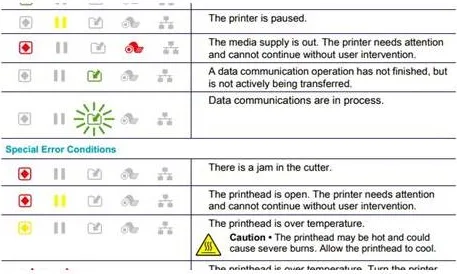
The five primary indicators on Zebra printersStatus, Pause, Data, Network, and Supplyprovide a wealth of information. Each indicator, with its distinct color patterns (steady, flashing, fading), points towards the general area of the problem, helping you narrow down the troubleshooting process. For example, a steady red Status light often indicates a media-related issue, while a flashing amber Network light suggests authentication problems.
Understanding the nuances of these light patterns is essential for effective troubleshooting. A flashing red Status light on a ZD421 might signify anything from a media out error to a printhead authentication failure. Similarly, an amber Status light could indicate a printhead overheat, element failure, or even memory issues. Consulting the printer's manual alongside this guide will offer a precise interpretation of these signals.
Consider a scenario where your ZD421 displays a flashing red Status light. First, check the media: Is the roll loaded correctly? Is the media compatible with the printer settings? If the media is fine, inspect the printhead: is it closed securely? Is it overheating? A flashing amber light, on the other hand, might point to a printhead overheat or element failure, necessitating a closer examination and potentially a replacement.
Network connectivity issues can also be diagnosed using indicator lights. On some models, a flashing red Network light indicates the printer is associating with the network. A transition to flashing amber signifies authentication mode, followed by flashing yellow during the authentication process. If the light remains red or amber for an extended period, it might suggest a problem with network configuration or credentials.
When encountering issues with your Zebra printer, a systematic approach is crucial. Start by checking the Status indicator light. Red typically indicates media issues, while yellow suggests the printer is paused. Next, verify the Data indicator to ensure data transfer is occurring smoothly. Low supplies, like labels or ribbon, can also disrupt printing, so check the Supply indicator. Finally, inspect the printhead for overheating or other issues. If the problem persists after these initial checks, consult the printer manual for a more detailed diagnosis.
If your Zebra printer is still giving you trouble, there are a few more things to consider. Ensure your printer model is supported by your software. Lightspeed, for example, supports specific Zebra models like the ZD421, ZD420, ZD411, and ZD410. Incompatibility can lead to unexpected behavior. When changing media types or sizes, ensure the printer settings are properly adjusted to match the new supplies. Mismatched settings can cause print quality issues, skipped labels, or media out errors.
If all else fails, don't hesitate to seek professional assistance. If your printer is under warranty, contact Zebra directly for support. For out-of-warranty printers, contacting a certified Zebra service provider is often the best course of action. They can diagnose and repair complex issues that are beyond the scope of basic troubleshooting.
Dealing with third-party sellers can add complexity to warranty claims. Some sellers require direct contact with Zebra for troubleshooting before accepting returns. This can be a frustrating process, but it's important to follow their instructions to avoid complications. If Zebra confirms a hardware defect, the third-party seller should honor the return or exchange policy.
Sometimes, seemingly simple issues can have complex causes. For instance, a printer may get stuck repeatedly despite correct media loading and settings. This might be due to subtle mechanical issues, firmware problems, or even environmental factors. Ambient temperature exceeding the printers operating range can affect performance and even cause malfunctions. Direct sunlight can raise internal temperatures and trigger unexpected behavior.
Remember, a thorough understanding of your Zebra printer's indicator lights is paramount for efficient troubleshooting. By familiarizing yourself with the various light patterns and their corresponding issues, you can quickly identify and address problems, minimize downtime, and ensure smooth printing operations. Don't be intimidated by blinking lights; they're your guide to a healthy, functioning printer. Use this knowledge to master your Zebra printer and keep your operations running efficiently.
Related: ["Only valid for select countertop refurbished stand mixer orders on kitchenaid.com.","Cannot be combined with other offers or rebates.","Kitchenaid mixer that wouldn't turn on after letting out the magic smoke.","Tearing it apart to find the broken piece, fixing it, and putting it back together.","But if one of your kitchenaid appliances starts to malfunction, your local mr.","Appliance \u00ae can help by providing expert kitchenaid repair service and customer support.","Backed by nearly three decades of experience, we offer kitchenaid appliance repair for most major kitchenaid appliances.","Learn more about the kitchenaid products we service below.","Here\u2019s how to repair your kitchenaid stand mixer without calling in a technician.","Kitchenaid stand mixer not turning on.","A functional kitchenaid mixer should switch on immediately after hitting the on\/off switch.","Your kitchenaid stand mixer probably isn\u2019t connected, or there\u2019s an issue with the outlet or wire if it won\u2019t turn on.","Learn all the details from zad about how to repair a kitchen aid stand mixer.","This detailed tutorial gives you every step.","Get a phone consult with zad:","Factors to consider when deciding to repair a kitchenaid mixer.","However, several factors should be considered before making the decision to repair or replace the appliance.","One crucial aspect to assess is the warranty status of your mixer","I'm amazed you were able to do it yourself!","My ka mixer broke a couple of months ago and i took it to a local shop (in ca) and they told me it would be $60 just for labor plus more for any parts needed.","Turn the stand mixer on at least once a month to prevent the inside seizing & this will also prevent & rectify any oil\/grease leaks;","Hinge pin adjustment for the tilt head stand mixer (for stand mixers prior to 2017) how to knead dough with a kitchenaid stand mixer.","How to layer your blender ingredients","Kitchenaid doesn't detail the costs of having their stand mixers repaired (although they do have a handy troubleshooting guide), but luckily food blogger alyssa of the floral apron recently sent her mixer in for a factory repair and wrote about her experience.","Carefully reassemble the mixer, following the user manual\u2019s instructions in reverse order.","Plug the mixer back in and turn it on to see if it starts.","Regular maintenance can help you troubleshoot and resolve issues with your kitchenaid stand mixer, but it also helps prevent future problems and extends its lifespan.","We also repair kitchenaid stand mixers.","Getting your stand mixer fixed used to mean sending it away for repairs.","Now we can repair your mixer in our shop and pick it up and drop it off to you for no extra fee.","You can schedule stand mixer repair service online.","So don't worry, click or call and let us take care of your appliance service needs","Repair or replace | kitchenaid.","I offer complete service on all kitchenaid k series home and professional type mixers.","I will rebuild\/refurbish your mixer to operate as well as, or better, than new.","All for a reasonable cost and a quick turnaround and with a comprehensive warranty.","Schedule service with an authorized kitchenaid service technician.","What can we help you with?","Select one of the options below for helpful repair or replace resources.","Kitchenaid brand is owned and distributed by whirlpool corporation.","How much does an average service appointment and repair cost?","Learn how to get your stand mixer repaired by the factory in greenville, ohio or by an authorized service facility.","Looking for help with your stand mixer?","Find answers to frequently asked questions from our very own kitchenaid\u00ae experts.","I troubleshoot 2 problems in","This household repair fixes the most common cause for why a kitchenaid mixer won't see how to take apart a kitchenaid stand mixer and replace its worm gear.","Learn how to fix it yourself.","Guides and repair information for kitchenaid mixers.","Kitchenaid mixers were developed in 1919 by the hobart manufacturing company.","If you are wondering how to repair a kitchenaid mixer, follow these steps:","Start by identifying the issue your kitchenaid mixer is experiencing.","Common problems include a mixer that won\u2019t turn on, produces strange noises, or operates at inconsistent speeds.","How to service kitchenaid mixer.","In this post, i\u2019m going to show you how to service your kitchenaid mixer.","It\u2019s important to keep your mixer in good condition, and this maintenance will help it last longer.","First, unplug the mixer and set it aside.","Then, remove the mixing bowl and the attachments.","Next, remove the screws that hold the mixer","See how to take apart a kitchenaid stand mixer and replace its worm gear.","This household repair fixes the most common cause for why a kitchenaid mixer won't","List of all kitchenaid centers \/ repairs in u.s.a.","(headphones and headsets, televisions, home theater systems, bluetooth\u00ae speakers, mobile solutions and more).","If the mixer has sentimental value or if the repair cost is significantly lower than purchasing a new one, repairing an old kitchenaid mixer can be a worthwhile option.","Now that you have a better understanding of how to repair a kitchenaid mixer, you can confidently tackle common issues that may arise.","If your favorite blender stops working, don\u2019t buy a new one!","Save some money and repair all the common blender repair issues including leaks, broken switches, faulty motors, problems with the blade assembly, and more.","Use accessories compatible to kitchenaid mixers.","Use only attachments and bowls that fit your mixer to avoid misalignment, bending, or warping.","Follow these simple tips to keep your kitchenaid mixer in good shape for years.","Don\u2019t let kitchenaid mixer mishaps stress you.","A kitchenaid mixer is a substantial investment for most of us."] | ["Users share their experiences and opinions on stream east, a pirated streaming site for sports, after it was taken down by regulators.","Some suggest other sites, some complain about ads and buffering, some praise the service.","We also have a guide on how to fix streameast if it\u2019s not working on xbox.","If you have any questions or suggestions, feel free to drop them in the comments below.","A user posts on r\/chrome that they cannot stream sports on streameast (dot) io with chrome browser.","Other users suggest alternative domains and ad blockers, but the problem persists.","Let\u2019s get into the solutions that actually work.","Try an alternative streameast domain.","If one url goes down, try another.","Some known working ones include:","Are you experiencing issues with streameast not working on your xbox?you\u2019re not alone.","Many users have encountered difficulties when trying to access streame","Streameast, a widely used online platform for live sports streaming, is known for offering free access to various nfl games.","Unfortunately, some readers have reported issues with streameast not working properly.","In this article, we will explore the possible reasons behind these problems and provide guidance on what to do if the errors persist.","Streameast, a widely used online platform for live sports streaming, is known for offering free access to various nfl games.unfortunately, some readers have reported issues with streameast not working properly.","Welcome to the hoobs\u2122 community subreddit.","If you\u2019re experiencing issues please check our q&a and documentation first:","Fix streameast not working or streaming problem clear browser cache and cookies.","Browsers store temporary data like cache and cookies to enhance your browsing","Some of the links on this page are affiliate links.","This means if you click on the link and purchase the item, we will receive an affiliate commission at no extra cost to you.","What should i do if streameast is not working?","If stream\u2019east is not working, check your internet connection and try using a vpn.","Clearing your browser cache or trying a different device might also help.","Is it safe to use streameast?","While many users have a positive experience, there are potential risks, including legal issues and malware.","En ce qui concerne le monde du streaming en ligne, stream east se distingue comme un choix de premier ordre pour de nombreux passionn\u00e9s.","Go to \u201cmy games & apps\u201d on the xbox dashboard.","Find streameast under \u201capps.\u201d press the controller\u2019s \u201cmenu\u201d button and choose \u201cuninstall.\u201d confirm by selecting \u201cuninstall all.\u201d return to the xbox store, search for streameast, and reinstall.","Streameast\u2019s free streams were seen as direct competition, cutting into these profits.","As with many similar sites, streameast faced legal challenges and constant takedown notices.","Various versions of the site would pop up under different urls, and users were often left guessing where the \u201creal\u201d streameast was.","What happened to streameast now?","Despite the homeland security investigations\u2019 (hsi) seizure of five streameast domains in august 2024, streameast immediately launched new mirror domains for its users to access the","Streameast appeals domain seizures (latest update) the latest update in this story involves the warrant that was issued to the tonic registry (which oversees.to domains).","This warrant did not include additional documentation or an explanation for the domain seizures.","Streameast now plans to appeal the decision in court.","If remember correctly i was curious as to why they were blocking my ip but, after some digging, the domain that was getting blocked was a streameast website that started with \u201cthe\u201d in its name and apparently its not an original domain, so i figured that \u201cstreameast.app\u201d was the better one since it would let me use a vpn.","You\u2019re all set to stream a big game\u2014snacks ready, comfy chair locked in\u2014and just as the match begins, streameast not working.","Whether you\u2019re seeing an error, a blank screen, or nothing is happening when you hit \u201cplay,\u201d you\u2019re definitely not the only one facing it.","How to solve problems with streameast.app.","Errors on the streameast.app website can be either on the server side or on your side (client side).","If there is practically nothing to be done about errors on the server side (it remains only to wait for the site to work again), then with errors on the client side it is possible to solve the problem with the availability of streameast.app on your own.","However, just like every other platform, streameast may face some issues.","Recently, many users have complained that their streameast not working on xbox.","There could be many reasons behind the issue.","You are at the right place if you also face the same issue.","This article will explain why streameast is not working and how to fix it.","Welcome to the btd5 subreddit, a place where you can hang out with your fellow monkeys by sharing all kinds of bloons tower defense 5 content, screenshots, videos, art, you name it you get it!","Ever been ready to watch a big game and then, bam!","When it comes to online streaming, stream east is a top choice for many fans.","But what do you do when you\u2019re all set to watch your favorite event and you get that annoying \u201cstreameast not working\u201d message?","Some of the links on this page are affiliate links.","This means if you click on the link and purchase the item, we will receive an affiliate commission at no extra cost to you.","Some of the links on this page are affiliate links.","This means if you click on the link and purchase the item, we will receive an affiliate commission at no extra cost to you."] | ["The pilot light on your water heater is the little blue flame used to light the gas streaming to your heater from the gas pipes coming from outside your home.","While some people believe that a water heater turns on when the pilot light ignites, traditional pilot lights are lit 24\/7.","The water heater pilot light is a small flame that ignites the gas burner on your water heater.","When the water heater pilot light goes out, first try relighting it, following the directions on the water heater label.","Not all gas water heaters use a pilot flame, but for those that do, repair clinic has identified the three most likely causes of that pilot not lighting or not staying lit.","First, let\u2019s examine the two different types of ignition systems gas water heaters use to heat the water.","For homes with gas water heaters, you should check your pilot light to make sure it didn\u2019t go out.","Depending on the age of your heater, you may be able to relight the pilot using an ignition button or a lighter.","Here are the top causes behind a pilot light that won\u2019t ignite and how you can address them.","The thermocouple is a safety feature that keeps the gas flowing only when the pilot light is lit.","In many cases, once you relight the pilot, you should be back in business.","In this article, we\u2019ll show you how easy it is to do it yourself.","If you live in a home with a gas water heater and notice cold water coming from your hot water faucet, there's a good chance your pilot light has gone out.","In most cases, you can relight a pilot without calling in a","A water heater\u2019s burner can fail when the pilot light works due to anything from a bad thermocouple to a damaged gas valve.","You don\u2019t need to be a plumber or electrician to inspect your water heater and discover the root of the problem.","Seek professional assistance for persistent pilot light problems, thermocouple replacements, or any complex gas supply issues.","Safety is paramount, so act immediately if you detect a gas leak.","Common causes of gas water heater pilot not lighting.","Several factors can lead to a gas water heater pilot light failing to ignite.","The pilot light might be failing to \u2018communicate\u2019 with the burner due to a malfunctioning gas valve and a corroded burner line and jet.","The pilot light is a small, continually burning flame that ignites the burner of your gas hot water heater.","Simply put, if the pilot light goes out, the unit can\u2019t warm up water.","There are many reasons why a pilot light could extinguish, and it could be as simple as a temporary interruption or air bubble in the gas line.","Struggling with a gas hot water heater pilot light that won\u2019t stay lit?","Discover maintenance advice to prevent future issues and learn when it\u2019s time to call a professional.","Struggling with a gas hot water heater pilot light that won\u2019t stay lit?","Discover maintenance advice to prevent future issues and learn when it\u2019s time to call a professional.","A faulty gas valve can severely impact the functionality of your water heater\u2019s pilot light.","The gas valve is responsible for regulating the flow of gas to the pilot light and the burner.","If it\u2019s not working correctly, it may not deliver a consistent gas flow, causing the pilot light to go out frequently.","A pilot light is a small gas flame, usually natural gas or liquefied petroleum gas, which serves as an ignition source for a more powerful gas burner.","Originally a pilot light was kept permanently alight, but this wastes gas.","Now it is more common to light a burner electrically, but gas pilot lights are still used when a high energy ignition","If you have no hot water to your gas hot water system, you may find that the pilot light has gone out.","This video gives slow clear instructions on how to re","The pilot will light, but the gas burner won\u2019t come on;","The pilot goes out occasionally;","The main indicator of the proper gas water heater operation and complete combustion is the stable light blue flame.","A gas water heater is not igniting because the pilot won\u2019t light.","If a gas water heater is not heating, the most","The root reasons behind honeywell hot water heater no status light includes:","No spark in the igniter.","Faulty gas control valve electrical connection.","Insufficient fuel supply furthermore, due to tripped thermal switch, lack of combustion air, and defective heater thermopile, owners will face no status light blinking issue on their water","When you need hot water, the thermostat signals the gas valve to release gas, which is ignited by the pilot light to heat the water.","Importance of a functional pilot light.","The importance of a functioning pilot light cannot be overstated.","Here are a few reasons why it is essential:","A working pilot light ensures you","Other than visually checking your hot water pilot light, other signs can point to a problem.","You might not have hot water or hear your heater running.","Here is how to check.","7 reasons why your pilot light keeps going out.","If your water heater pilot light keeps going out, it may be due to one or more of these common problems.","A dirty pilot light orifice hinders gas flow, but the fix is simple.","First, shut off the gas to the water heater (look for a valve on the gas line that supplies the unit).","There are 3 common types of gas hot water systems:","1) storage tank gas hot water.","2) instantaneous gas hot water system.","3) continuous flow gas hot water system.","If your gas hot water is not working, then it is likely that your gas pilot light has gone out.","The pilot light can go out for a few reasons:","Reassemble and test the pilot light.","Verify gas flow to ensure your heater receives a steady supply.","A blocked or closed gas line can extinguish the pilot light.","Confirm the gas valve is fully open.","Check for any kinks or blockages in the gas line.","Listen for a hissing sound near the connections, which indicates gas flow.","If your pilot light isn\u2019t working on a gas heater, your gas valve can potentially continue to release gas in the air.","Enough gas in the air causes a potentially dangerous situation, which can sometimes lead to major fires.if this is a concern, the easiest way to solve this issue is by turning off the gas valve on your water heater.","If it didn\u2019t work, simply try again.","Think the pilot light might not be the problem?","Here\u2019s further information on troubleshooting instant gas hot water systems.","Gold coast\u2019s gas hot water experts can help today!"]