Ever wonder how you sprint, crouch, or interact with the environment in your favorite Xbox games? The often-unlabeled L3 button is the secret weapon in your gaming arsenal.
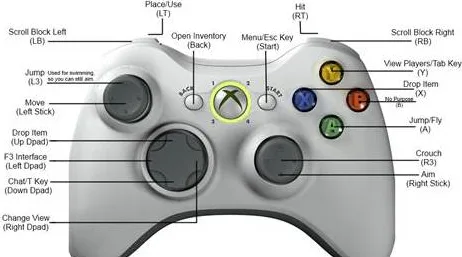
The L3 button isn't a separate button in the traditional sense. Instead, it's the function activated when you press down on the left analog stick (also known as the left thumbstick or L stick). This clicking action registers as a separate button input, opening up a world of in-game possibilities.
Feature
Description
Name
L3 Button
Location
Left Analog Stick
Activation
Pressing down on the left analog stick
Common Functions
Sprinting, crouching, melee attacks, interacting with objects/NPCs
Variations
Functionality can be customized within individual games.
Troubleshooting
Consult the Xbox controller's user manual or Xbox Support for assistance with any issues.
Reference
Xbox Support
While most commonly associated with sprinting or crouching, the L3 button's functionality extends far beyond these basic actions. In many games, it allows for close-quarters combat maneuvers like melee attacks, initiating conversations with non-playable characters (NPCs), or interacting with objects in the game world. This seemingly simple click opens a layer of tactical depth, giving players more control over their in-game actions.
The L3 buttons unassuming nature can sometimes lead to confusion, especially for newcomers to the Xbox ecosystem. Unlike the clearly labeled face buttons (A, B, X, Y) or the shoulder buttons (LB, RB, LT, RT), the L3 buttons function is often learned through in-game tutorials or by exploring the controller's capabilities. This implicit design keeps the controller streamlined while maximizing its functionality.
Across different generations of Xbox controllers, from the Xbox 360 to the latest Xbox Series X|S, the L3 button maintains its core function and location on the left analog stick. While the overall design and additional features of the controllers have evolved, the L3 button remains a consistent element, ensuring a familiar experience for players.
Troubleshooting L3 button issues typically involves checking for physical obstructions or contacting Xbox support for more complex problems. Sometimes, debris or wear and tear can affect the button's responsiveness. In such cases, carefully cleaning the area around the analog stick can often resolve the issue. For more persistent problems, consulting the Xbox support website or contacting customer service directly can provide tailored solutions.
The L3 button, while subtly integrated into the Xbox controller, plays a significant role in enhancing gameplay across a diverse range of titles. Its versatility allows developers to map a variety of actions to this single input, making it an essential component of the Xbox gaming experience. Whether sprinting across a battlefield, initiating a stealth takedown, or simply interacting with the game world, the L3 button adds a layer of control and dynamism that enriches the player's journey.
Understanding the L3 buttons functionality is crucial for mastering the nuances of Xbox gaming. It's more than just a clickable stick; it's a gateway to deeper interaction and control, allowing players to fully immerse themselves in the virtual worlds they explore. So, the next time you pick up your Xbox controller, take a moment to appreciate the power held within that simple click of the L3 button.
While often overlooked, the L3 buttons impact on gameplay is undeniable. Its versatility and subtle integration into the controller design showcase the thoughtful engineering behind the Xbox ecosystem. From sprinting to strategizing, the L3 button empowers players to engage with their games on a deeper level, adding another dimension to the interactive experience. So, go ahead, click that left stick and unleash the full potential of your Xbox controller.
The evolution of gaming controllers has seen numerous innovations, but the L3 button remains a testament to the power of simple yet effective design. Its consistent presence across different Xbox generations underscores its importance in shaping the way we interact with virtual worlds. As game developers continue to push the boundaries of interactive entertainment, the L3 button will undoubtedly continue to play a crucial role in bringing those experiences to life.
Related: ["The l3 button on your xbox controller is the press switch on the ls (left stick).","Read below to learn what the l3 is used for and how to fix it if you're having trouble.","The xbox controller is a vital component for any console gamer.","The l3 button refers to pressing down on the left analog stick of an xbox controller.","It serves as an additional input that enables secondary functions in games like sprinting, crouching, and interacting with objects.","The term \u201cl3\u201d on an xbox one s controller refers to the left analog stick button, which is one of the buttons you can press down on the left analog stick.","I bought one for pc gaming a few days ago, and i use it for a lot of things, including emulated ps2 games, where some of them use l3\/r3 buttons.","However, unlike on a playstation controller, i can't seem to find them, where are they?","L3 on an xbox controller refers to the left analog stick button.","It is one of the most important buttons on the controller, and its function is to simulate the pressing down of the left analog stick.","The term \u201cl3\u201d on an xbox one s controller refers to the left analog stick button, which is one of the buttons you can press down on the left analog stick.","Here\u2019s where you can find the l3 button on different xbox controllers:","The l3 button is located on the left analog stick, along with the lt and lb buttons.","The l3 button is still located on the left analog stick, but the xbox series x\/s controller has a more refined design with a share button and a mute button.","For xbox series x|s, we\u2019ve streamlined the xbox wireless controller for comfort, performance, and instant sharing.","The controller also works great with xbox one, pc, and cloud gaming devices.","For info about remapping your controller\u2019s buttons, visit:","If the l3 button (left analog stick click) for sprinting is not working properly on your xbox one controller, you can try the following steps to troubleshoot","Learn about the xbox one wireless controller with illustrated and detailed descriptions of the controller\u2019s front and back features.","The term \u201cl3\u201d on an xbox one s controller refers to the left analog stick button, which is one of the buttons you can press down on the left analog stick.","So, there's no l3 button on an xbox one controller, but the left stick (ls) can be clicked or pressed as an input in many games, similar to how \u201cl3\u201d is used on playstation controllers.","What does l3 mean on xbox?","L3 refers to the left analog stick pressed down on an xbox controller.","Pressing down on the left thumbstick activates the l3 button.","Why is my l3 button not working?","If your l3 button is not working, it could be due to a hardware issue or a problem with the controller.","Press the touch pad to use the touch pad button.","Press down on the stick to use it as the r3 button.","Press down on the stick to use it as the l3 button.","Did ps2 have l3 r3?","Playstation (2) controller port, proprietary 2.4 ghz wireless.",", l1, r1, l2, r2, start and select), three digital buttons (l3, r3 and the analog mode button) and two analog","Press the touch pad to use the touch pad button.","Press down on the stick to use it as the r3 button.","Press down on the stick to use it as the l3 button.","Did ps2 have l3 r3?","Playstation (2) controller port, proprietary 2.4 ghz wireless.",", l1, r1, l2, r2, start and select), three digital buttons (l3, r3 and the analog mode button) and two analog","Test the l3 button functionality;","L3 button feels stuck or not clicking.","If the l3 button doesn\u2019t provide the expected tactile feedback:","Locate the small reset button on the back of your controller (near the l2 button) use a paperclip or similar small object to press and hold the reset button for 5 seconds","The term \u201cl3\u201d on an xbox one s controller refers to the left analog stick button, which is one of the buttons you can press down on the left analog stick.","The playstation took it a step further with the \u201cl1\u201d \/ \u201cl2\u201d and \u201cr1\u201d \/ \u201cr2\u201d buttons.","The confusion comes in because different games use different names for these buttons.","If you have problems with your xbox one controller not sprinting or l3 \/ r3 not working properly you might want to fill the gap between the stick and tact bu","What button is r3 on xbox?","R3 on xbox refers to the right analog stick button.","It is often used by game developers to provide extra functionality or shortcuts within games.","What is l3 on xbox?","L3 is the left analog stick pressed down.","What button is 3 on xbox?","This button is just to the lower left of the xbox button.","The button\u2019s functions vary depending on the app or game.","This port is on the top edge of the controller above the xbox button.","How do you press l3 on a controller?","Press the touch pad to use the touch pad button.","What is the l3 equivalent on xbox?","It\u2019s the left analog stick.","Press the left joystick down and you will hear a click.","Xbox label their analog stick as ls (l3) and rs (r3).","What is 3 on xbox controller?","This button is just to the lower left of the xbox button.","The button\u2019s functions vary depending on the app or game.","What\/where are the l3\/r3 equivalents on the xbox one controller?","I bought one for pc gaming a few days ago, and i use it for a lot of things, including emulated ps2 games, where some of them use l3\/r3 buttons.","The term \u201cl3\u201d on an xbox one s controller refers to the left analog stick button, which is one of the buttons you can press down on the left analog stick.","Press the xbox button to open the guide, select profile & system > settings > devices & streaming > accessories, and then select the controller you want to update.","On the xbox wireless controller screen, select \u201c\u2026\u201d to check the firmware version for your controller.","The xbox l3 and r3 buttons are located on the front of the controller, near the a and b buttons.","Using the l3 button changes the sensitivity of the controller\u2019s motion sensors.","R3 is a special attack that lets you change your weapon quickly, and it\u2019s used to access the options menu.","So l3 provides an extra button without needing more physical face buttons, serving an important purpose on controllers with space constraints.","Game creators utilize l3 and r3 for anything","The term \u201cl3\u201d on an xbox one s controller refers to the left analog stick button, which is one of the buttons you can press down on the left analog stick."] | ["Users share their experiences and opinions on stream east, a pirated streaming site for sports, after it was taken down by regulators.","Some suggest other sites, some complain about ads and buffering, some praise the service.","We also have a guide on how to fix streameast if it\u2019s not working on xbox.","If you have any questions or suggestions, feel free to drop them in the comments below.","A user posts on r\/chrome that they cannot stream sports on streameast (dot) io with chrome browser.","Other users suggest alternative domains and ad blockers, but the problem persists.","Let\u2019s get into the solutions that actually work.","Try an alternative streameast domain.","If one url goes down, try another.","Some known working ones include:","Are you experiencing issues with streameast not working on your xbox?you\u2019re not alone.","Many users have encountered difficulties when trying to access streame","Streameast, a widely used online platform for live sports streaming, is known for offering free access to various nfl games.","Unfortunately, some readers have reported issues with streameast not working properly.","In this article, we will explore the possible reasons behind these problems and provide guidance on what to do if the errors persist.","Streameast, a widely used online platform for live sports streaming, is known for offering free access to various nfl games.unfortunately, some readers have reported issues with streameast not working properly.","Welcome to the hoobs\u2122 community subreddit.","If you\u2019re experiencing issues please check our q&a and documentation first:","Fix streameast not working or streaming problem clear browser cache and cookies.","Browsers store temporary data like cache and cookies to enhance your browsing","Some of the links on this page are affiliate links.","This means if you click on the link and purchase the item, we will receive an affiliate commission at no extra cost to you.","What should i do if streameast is not working?","If stream\u2019east is not working, check your internet connection and try using a vpn.","Clearing your browser cache or trying a different device might also help.","Is it safe to use streameast?","While many users have a positive experience, there are potential risks, including legal issues and malware.","En ce qui concerne le monde du streaming en ligne, stream east se distingue comme un choix de premier ordre pour de nombreux passionn\u00e9s.","Go to \u201cmy games & apps\u201d on the xbox dashboard.","Find streameast under \u201capps.\u201d press the controller\u2019s \u201cmenu\u201d button and choose \u201cuninstall.\u201d confirm by selecting \u201cuninstall all.\u201d return to the xbox store, search for streameast, and reinstall.","Streameast\u2019s free streams were seen as direct competition, cutting into these profits.","As with many similar sites, streameast faced legal challenges and constant takedown notices.","Various versions of the site would pop up under different urls, and users were often left guessing where the \u201creal\u201d streameast was.","What happened to streameast now?","Despite the homeland security investigations\u2019 (hsi) seizure of five streameast domains in august 2024, streameast immediately launched new mirror domains for its users to access the","Streameast appeals domain seizures (latest update) the latest update in this story involves the warrant that was issued to the tonic registry (which oversees.to domains).","This warrant did not include additional documentation or an explanation for the domain seizures.","Streameast now plans to appeal the decision in court.","If remember correctly i was curious as to why they were blocking my ip but, after some digging, the domain that was getting blocked was a streameast website that started with \u201cthe\u201d in its name and apparently its not an original domain, so i figured that \u201cstreameast.app\u201d was the better one since it would let me use a vpn.","You\u2019re all set to stream a big game\u2014snacks ready, comfy chair locked in\u2014and just as the match begins, streameast not working.","Whether you\u2019re seeing an error, a blank screen, or nothing is happening when you hit \u201cplay,\u201d you\u2019re definitely not the only one facing it.","How to solve problems with streameast.app.","Errors on the streameast.app website can be either on the server side or on your side (client side).","If there is practically nothing to be done about errors on the server side (it remains only to wait for the site to work again), then with errors on the client side it is possible to solve the problem with the availability of streameast.app on your own.","However, just like every other platform, streameast may face some issues.","Recently, many users have complained that their streameast not working on xbox.","There could be many reasons behind the issue.","You are at the right place if you also face the same issue.","This article will explain why streameast is not working and how to fix it.","Welcome to the btd5 subreddit, a place where you can hang out with your fellow monkeys by sharing all kinds of bloons tower defense 5 content, screenshots, videos, art, you name it you get it!","Ever been ready to watch a big game and then, bam!","When it comes to online streaming, stream east is a top choice for many fans.","But what do you do when you\u2019re all set to watch your favorite event and you get that annoying \u201cstreameast not working\u201d message?","Some of the links on this page are affiliate links.","This means if you click on the link and purchase the item, we will receive an affiliate commission at no extra cost to you.","Some of the links on this page are affiliate links.","This means if you click on the link and purchase the item, we will receive an affiliate commission at no extra cost to you."] | ["The pilot light on your water heater is the little blue flame used to light the gas streaming to your heater from the gas pipes coming from outside your home.","While some people believe that a water heater turns on when the pilot light ignites, traditional pilot lights are lit 24\/7.","The water heater pilot light is a small flame that ignites the gas burner on your water heater.","When the water heater pilot light goes out, first try relighting it, following the directions on the water heater label.","Not all gas water heaters use a pilot flame, but for those that do, repair clinic has identified the three most likely causes of that pilot not lighting or not staying lit.","First, let\u2019s examine the two different types of ignition systems gas water heaters use to heat the water.","For homes with gas water heaters, you should check your pilot light to make sure it didn\u2019t go out.","Depending on the age of your heater, you may be able to relight the pilot using an ignition button or a lighter.","Here are the top causes behind a pilot light that won\u2019t ignite and how you can address them.","The thermocouple is a safety feature that keeps the gas flowing only when the pilot light is lit.","In many cases, once you relight the pilot, you should be back in business.","In this article, we\u2019ll show you how easy it is to do it yourself.","If you live in a home with a gas water heater and notice cold water coming from your hot water faucet, there's a good chance your pilot light has gone out.","In most cases, you can relight a pilot without calling in a","A water heater\u2019s burner can fail when the pilot light works due to anything from a bad thermocouple to a damaged gas valve.","You don\u2019t need to be a plumber or electrician to inspect your water heater and discover the root of the problem.","Seek professional assistance for persistent pilot light problems, thermocouple replacements, or any complex gas supply issues.","Safety is paramount, so act immediately if you detect a gas leak.","Common causes of gas water heater pilot not lighting.","Several factors can lead to a gas water heater pilot light failing to ignite.","The pilot light might be failing to \u2018communicate\u2019 with the burner due to a malfunctioning gas valve and a corroded burner line and jet.","The pilot light is a small, continually burning flame that ignites the burner of your gas hot water heater.","Simply put, if the pilot light goes out, the unit can\u2019t warm up water.","There are many reasons why a pilot light could extinguish, and it could be as simple as a temporary interruption or air bubble in the gas line.","Struggling with a gas hot water heater pilot light that won\u2019t stay lit?","Discover maintenance advice to prevent future issues and learn when it\u2019s time to call a professional.","Struggling with a gas hot water heater pilot light that won\u2019t stay lit?","Discover maintenance advice to prevent future issues and learn when it\u2019s time to call a professional.","A faulty gas valve can severely impact the functionality of your water heater\u2019s pilot light.","The gas valve is responsible for regulating the flow of gas to the pilot light and the burner.","If it\u2019s not working correctly, it may not deliver a consistent gas flow, causing the pilot light to go out frequently.","A pilot light is a small gas flame, usually natural gas or liquefied petroleum gas, which serves as an ignition source for a more powerful gas burner.","Originally a pilot light was kept permanently alight, but this wastes gas.","Now it is more common to light a burner electrically, but gas pilot lights are still used when a high energy ignition","If you have no hot water to your gas hot water system, you may find that the pilot light has gone out.","This video gives slow clear instructions on how to re","The pilot will light, but the gas burner won\u2019t come on;","The pilot goes out occasionally;","The main indicator of the proper gas water heater operation and complete combustion is the stable light blue flame.","A gas water heater is not igniting because the pilot won\u2019t light.","If a gas water heater is not heating, the most","The root reasons behind honeywell hot water heater no status light includes:","No spark in the igniter.","Faulty gas control valve electrical connection.","Insufficient fuel supply furthermore, due to tripped thermal switch, lack of combustion air, and defective heater thermopile, owners will face no status light blinking issue on their water","When you need hot water, the thermostat signals the gas valve to release gas, which is ignited by the pilot light to heat the water.","Importance of a functional pilot light.","The importance of a functioning pilot light cannot be overstated.","Here are a few reasons why it is essential:","A working pilot light ensures you","Other than visually checking your hot water pilot light, other signs can point to a problem.","You might not have hot water or hear your heater running.","Here is how to check.","7 reasons why your pilot light keeps going out.","If your water heater pilot light keeps going out, it may be due to one or more of these common problems.","A dirty pilot light orifice hinders gas flow, but the fix is simple.","First, shut off the gas to the water heater (look for a valve on the gas line that supplies the unit).","There are 3 common types of gas hot water systems:","1) storage tank gas hot water.","2) instantaneous gas hot water system.","3) continuous flow gas hot water system.","If your gas hot water is not working, then it is likely that your gas pilot light has gone out.","The pilot light can go out for a few reasons:","Reassemble and test the pilot light.","Verify gas flow to ensure your heater receives a steady supply.","A blocked or closed gas line can extinguish the pilot light.","Confirm the gas valve is fully open.","Check for any kinks or blockages in the gas line.","Listen for a hissing sound near the connections, which indicates gas flow.","If your pilot light isn\u2019t working on a gas heater, your gas valve can potentially continue to release gas in the air.","Enough gas in the air causes a potentially dangerous situation, which can sometimes lead to major fires.if this is a concern, the easiest way to solve this issue is by turning off the gas valve on your water heater.","If it didn\u2019t work, simply try again.","Think the pilot light might not be the problem?","Here\u2019s further information on troubleshooting instant gas hot water systems.","Gold coast\u2019s gas hot water experts can help today!"]